
A Visual Node Editor for Scientific Data Pipelines
Drag, connect, and run data processing workflows — powered by the Zyra framework. A manifest-driven visual interface for orchestrating CLI pipelines in the browser.
 View Online
Scientific Data Workflows
Turning raw observations into actionable products requires a chain of acquisition, processing, visualization, and dissemination steps — often spanning dozens of tools, formats, and protocols.
Workflows at NOAA's Global Systems Laboratory
GSL produces operational weather products, experimental forecasts, and research datasets. These workflows run daily — often involving dozens of steps across heterogeneous tools, formats (GRIB2 NetCDF), and protocols (S3 FTP HTTP).
Scientists spend time writing shell scripts, cron jobs, and glue code instead of doing science.
Ad-hoc scripts are hard to version, share, and reproduce across teams and environments.
Pipelines span multiple tools, formats, and protocols with no unified view of the entire workflow.
Built on the Zyra Framework
Zyra is a CLI-first Python framework for acquiring, processing, visualizing, and narrating scientific data. The Editor brings that power to a visual interface.
 Zyra Poster
Scientific workflows span heterogeneous data sources — HTTP FTP S3 APIs — and diverse formats like GRIB2 NetCDF GeoTIFF. They require repeatable transformation chains and produce outputs ranging from static maps to interactive visualizations.
Zyra standardizes these steps into a modular, CLI-driven pipeline.
Every stage streams via stdin/stdout for Unix-style composition.
Three layers of access — CLI, Python API, and MCP — all share the same pipeline architecture.
The Editor drives the CLI directly via a lightweight FastAPI server.
Try It Live
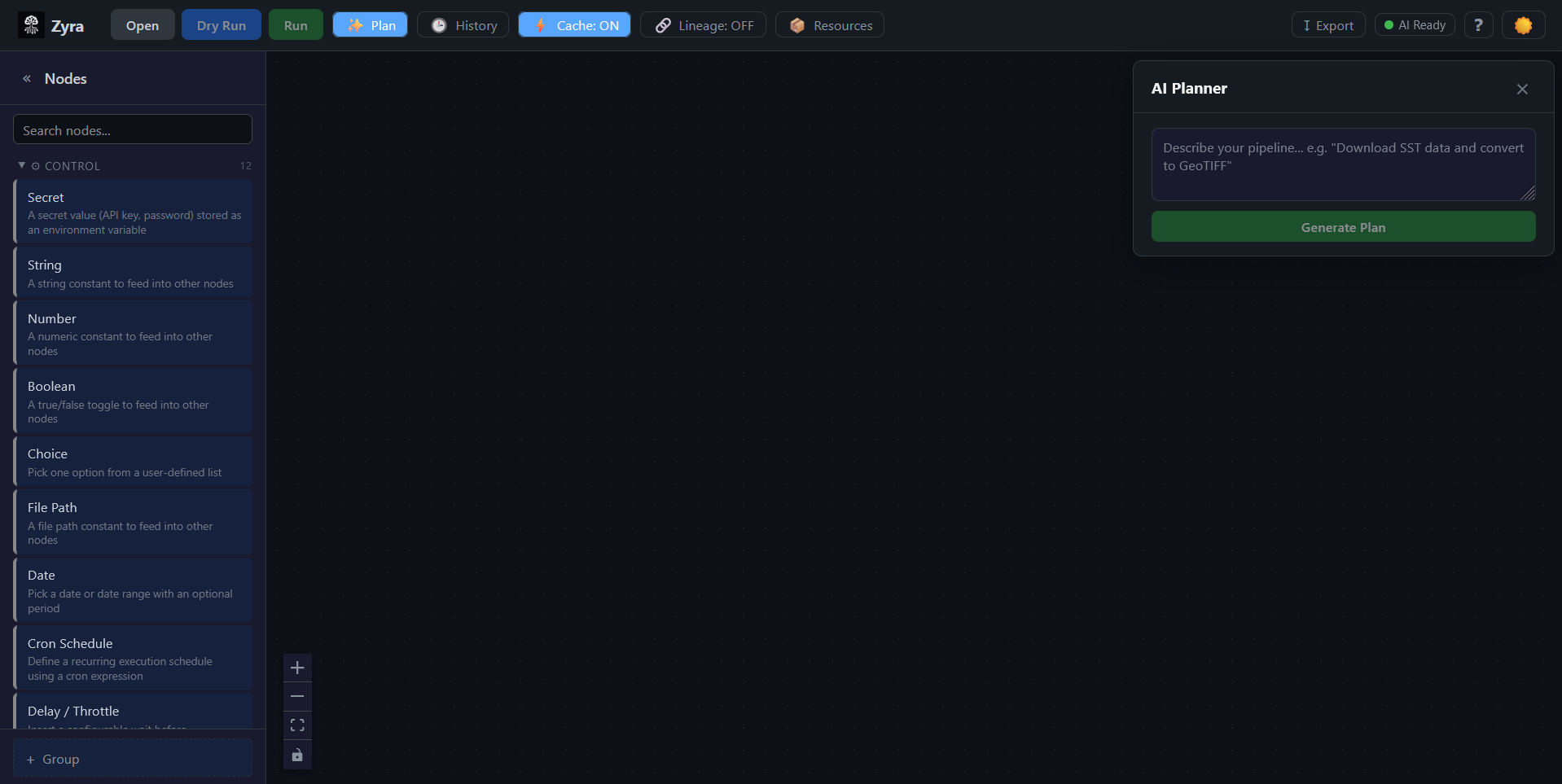
The editor is embedded below. If it's not loading, start the containers with
docker compose up --build and reload this page.
The editor runs at localhost:5173.
The editor is not running.
Start the development server to see the live demo:
docker compose up --build
Then reload this page. The editor will appear here.
How the Editor Works
The editor reads a manifest from the Zyra CLI, presents stages as draggable nodes, and exports your visual graph back to executable pipeline YAML.
The Zyra CLI exposes a manifest — a JSON document describing every available stage, its arguments, input/output ports, and type constraints. The editor loads this manifest and transforms it into an interactive canvas.
Users browse stages in the Node Palette (grouped by category), drag them onto the canvas, and connect ports to form a directed acyclic graph. The editor enforces type-safe connections — only compatible port types can link.
When you're ready, the graph is topologically sorted and serialized to pipeline YAML — the same format the Zyra CLI consumes. You can also import existing YAML files back into the visual editor.
Monorepo Structure
| Package | Path | Role |
|---|---|---|
@zyra/core |
packages/core/ |
Zero-dependency TypeScript library — graph types, port validation, pipeline serialization |
@zyra/editor |
packages/editor/ |
React 18 + Vite visual editor UI using XYFlow (React Flow) |
| Server | server/ |
FastAPI backend — proxies the Zyra CLI, runs async jobs, streams logs via WebSocket |
Key Features
Everything you need to visually build, configure, execute, and export scientific data pipelines.
Browse stages in the Node Palette, drag them onto the canvas, and connect type-safe ports. The @zyra/core library validates compatibility — only matching types can link.
Select any node to configure its CLI arguments via the detail panel. Supports text, numbers, booleans, file paths, dropdowns, and cron expressions.
Run pipelines with WebSocket log streaming and per-node status indicators. Track past runs with timing visualization and Gantt charts.
Export your visual graph to pipeline.yaml via topological sort, or import existing YAML back into the editor. Full round-trip between visual design and CLI.
Describe what you want in natural language — the Planner Panel generates a pipeline plan, translates it to a visual graph, and lets you refine it.
Secrets are AES-256-GCM encrypted at rest — never written to YAML. Define reusable resources (URLs, paths, credentials) and reference them across nodes.
Tech Stack
A modern TypeScript + React frontend backed by a FastAPI server, all containerized with Docker.
Frontend
- React 18 with TypeScript 5.4
- Vite 5.4 (dev server + bundler)
- XYFlow / React Flow 12 (node graph)
- js-yaml (YAML serialization)
- Web Crypto API (AES-256-GCM)
Core Library
- Zero external dependencies
- TypeScript strict mode
- Graph types & interfaces
- Port compatibility validation
- Topological sort & serialization
Backend & Infra
- FastAPI + Uvicorn (Python 3.11)
- WebSocket log streaming
- Docker Compose (editor + server)
- pnpm workspaces (monorepo)
- Vitest (TS) + Pytest (Python)
Help Shape the Future of Agentic Science
We're exploring how intelligent agents can automate and coordinate complex scientific workflows — and we're asking for your help. Share how you actually work with data through the Zyra Workflow Insights Survey.
By sharing your workflow practices and challenges, you'll help us identify:
- Which agentic tools offer the greatest real-world value
- Where current automation still falls short
- How to build an intent dataset to train Zyra's task decomposition system
Your insights directly guide how we design and prioritize future tools built to amplify human creativity, efficiency, and discovery. Responses are used anonymously for research and system improvement; do not include sensitive or confidential data.
 Scan to respond